



Latest Version
October 07, 2025
Pixamo Pty Ltd
Arcade
iOS
0
Report a Problem
More About :game
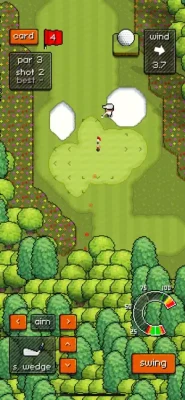
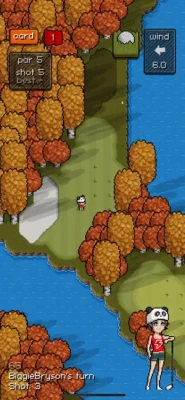
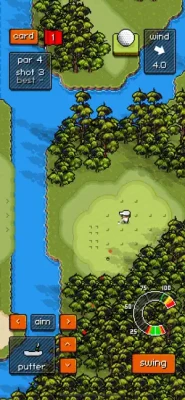
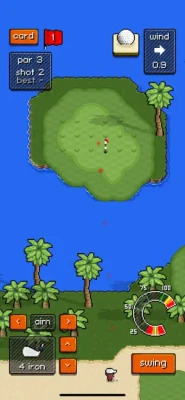
The game currently features more than 50 unique courses and over 800 holes, giving players a large collection of layouts to learn and master. Each course has its own visual style and playing conditions, making club selection, shot placement and course knowledge important parts of the experience.
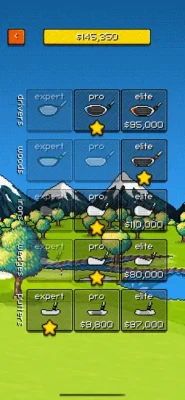
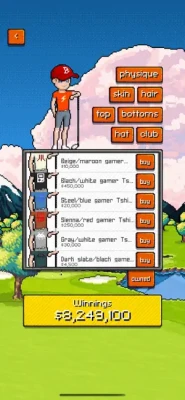
Pixel Pro Golf is designed to be easy to pick up but increasingly challenging as players progress through different tours. Successful tournament performances earn winnings that can be used to upgrade equipment, from the driver through to the putter, or customize the golfer with different clothing and accessories.
Pixel Pro Golf Game Information
Game: Pixel Pro Golf
Developer: Pixamo
Genre: Sports / Golf / Arcade
Platform: iPhone, iPad, iPod touch and Apple Vision
Age Rating: 4+
Current Version: 9.1.5
Latest Listed Update: September 8, 2026
Required iOS: iOS 13.0 or later
Language: English
Monetization: Free with optional in-app purchases
Courses: 50+
Holes: 800+
Game Modes: Single Player, Online Multiplayer, iMessage and Quick Play
Tournaments: Daily tournaments, seasonal competitions and Major events
Online Players: Up to 4 players
Leagues: Open and Handicap
Features: Equipment upgrades, character customization, video replays, leaderboards, achievements and challenges
The App Store currently shows Pixel Pro Golf with a 4.7/5 rating and approximately 32K ratings on the U.S. listing.
What Makes Pixel Pro Golf Special?
Pixel Pro Golf doesn't try to be an ultra-realistic golf simulator.
Instead, it combines:
Retro pixel-art visuals
Straightforward controls
Realistic physics
Relaxing audio
Competitive leaderboards
Career progression
Equipment upgrades
Online multiplayer
Daily tournaments
The result is a golf game that can be played casually but also rewards players who learn courses and improve their shot planning.
Pixel Pro Golf Single-Player Career
The single-player mode is the main progression experience.
Players work through different tours by performing well and earning ranking points. Progress eventually leads toward the game's Major events.
The basic progression loop is:
Play → Improve your score → Earn ranking points → Unlock tours → Win tournaments → Upgrade equipment → Take on harder courses
The game gives players a reason to replay courses because improving scores helps with progression and rankings.
Career Strategy
Don't rush through every tour simply to unlock the next one.
Use easier courses to build a reliable understanding of:
Club distances
Wind behavior
Ball trajectory
Fairway slopes
Green speed
Putting angles
Bounce and roll
Course knowledge becomes increasingly valuable when you reach harder tournaments.
Pixel Pro Golf Courses and Holes
Pixel Pro Golf currently advertises 50+ unique courses and more than 800 holes. Each course can introduce different layouts and conditions that affect how you should approach a round.
A good score isn't only about hitting the ball as far as possible.
You need to consider:
Fairway Position
A slightly shorter shot that leaves you in a good position can be better than maximum distance followed by a difficult approach.
Hazards
Avoid unnecessary risks when a safer route still gives you a reasonable scoring opportunity.
Trees
Trees can drastically change the angle available for the next shot.
If you're uncertain whether a route is safe, consider the consequences of missing rather than focusing only on the ideal trajectory.
Greens
Getting onto the green is only half the job.
A poor approach can leave a difficult putt even when the shot technically reaches the green.
Pixel Pro Golf Controls Guide
Pixel Pro Golf keeps the basic controls simple.
You can:
Aim your shot
Change clubs
Adjust your swing
Hit the ball
Plan shots using the course view
The simplicity of the controls is deceptive because good results depend heavily on how you combine club selection, positioning and shot power.
Pixel Pro Golf Beginner Strategy
1. Learn Your Clubs
Before attempting aggressive shots, learn approximately how far each club can send the ball.
Knowing your club distances allows you to plan approaches instead of guessing.
2. Don't Always Maximize Distance
The longest possible shot isn't automatically the best shot.
Sometimes positioning is more important than raw distance.
3. Aim for the Safe Side
If one side of a fairway has trees, hazards or difficult terrain, favor the safer side when possible.
4. Think About the Next Shot
Don't judge a shot only by where the ball lands.
Ask:
Where will I be hitting from next?
A good position can make the next shot dramatically easier.
5. Practice Putting
Putting can determine whether a solid hole becomes a birdie, par or worse.
Spend time learning how the ball responds to your aim and power.
Pixel Pro Golf Club Upgrade Strategy
Tournament winnings can be used to upgrade equipment, including clubs ranging from the driver to the putter.
Instead of upgrading randomly, think about which part of your game causes the most problems.
Driver
A stronger driver can help you gain more distance from the tee.
However, distance is most useful when you can keep the ball under control.
Fairway Clubs
These become important when you need to cover distance while maintaining a manageable approach.
Approach Clubs
Approach accuracy becomes increasingly important on courses where the green is difficult to reach or surrounded by hazards.
Putter
Putting equipment can be valuable because small improvements around the green can affect your final score across an entire tournament.
Upgrade Principle
Don't simply upgrade whichever club becomes available first.
Consider:
Which club is costing me the most strokes?
That should generally receive your attention first.
Pixel Pro Golf Putting Guide
Putting deserves special attention.
A long drive can look impressive, but a poor putt can quickly erase the advantage.
Read the Green
Before committing to a putt, examine the line carefully.
Think about:
Direction
Distance
Slope
Speed
Where the ball will finish if you miss
Avoid Overhitting
A putt that races past the hole can leave you with another difficult attempt.
Controlled putting is often more reliable than aggressive putting.
Focus on Two-Putt Golf
For difficult greens, getting close enough for a reliable second putt can be a better strategy than attempting an extremely aggressive first putt.
Pixel Pro Golf Shot Strategy
Drive for Position
Your opening shot should set up the rest of the hole.
If maximum distance creates a difficult second shot, consider a more controlled drive.
Approach Carefully
The approach is often where a good hole becomes a great hole.
Don't automatically aim directly at the flag.
Consider the surrounding area and where the ball is likely to roll.
Use Safer Lines
If a direct route introduces significant risk, use a safer angle.
A par is often better than turning a manageable hole into a disaster.
Pixel Pro Golf Wind Strategy
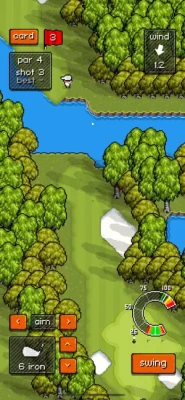
Wind can change the outcome of a shot significantly.
When conditions are difficult:
Check the wind direction.
Consider how strongly it will affect the ball.
Adjust your aim.
Avoid aiming directly at your intended landing point without accounting for wind.
Favor a wider safety area when conditions are uncertain.
On challenging courses, wind management becomes just as important as club selection.
Pixel Pro Golf Daily Tournaments
Daily tournaments are one of the game's major competitive features.
Each day offers a new tournament on a different course, and players have one attempt to establish their score. Results can then be compared on a global leaderboard.
This changes the way you should approach a tournament.
You don't have unlimited attempts to experiment.
Daily Tournament Strategy
Practice First
If you know the course, use your knowledge before entering the competitive attempt.
Avoid Unnecessary Risks
One aggressive shot can ruin an otherwise strong score.
Play for Consistency
The goal isn't always to produce the most spectacular shot.
It's to complete the round with as few mistakes as possible.
Watch Your Score
Every stroke matters when you're competing against a global leaderboard.
Pixel Pro Golf Tournament Seasons
Daily tournaments are organized into 20-event seasons.
Players who finish within the top 500 in a daily event earn season points, which contribute toward the overall seasonal competition.
This creates two different goals:
Daily goal: Produce the best possible score today.
Season goal: Consistently earn points over multiple events.
Consistency therefore becomes particularly important for players who want to compete across an entire season.
Pixel Pro Golf Open vs Handicap
Pixel Pro Golf includes two tournament formats:
Open
Your normal score counts directly.
This format places the emphasis on raw performance.
Handicap
The game applies a handicap system that gives less accomplished players additional shots.
This allows players of different skill levels to compete through performance relative to their ability.
Handicap Strategy
Don't compare yourself only to players with better raw scores.
Focus on playing within your ability and maximizing the advantage provided by the handicap format.
Pixel Pro Golf Major Tournaments
Major events are multi-day competitions.
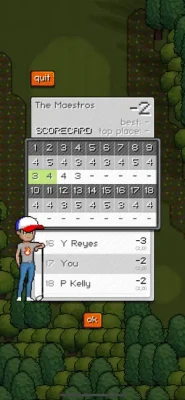
The game lists Major events such as The Maestros and American Open, with scores aggregated across four days.
That means one poor hole doesn't necessarily end your tournament.
The important skill is maintaining a strong overall score.
Major Tournament Tips
Avoid unnecessary risks.
Protect good rounds.
Don't chase impossible shots after making a mistake.
Focus on the next hole.
Learn the course before the competition.
Manage difficult weather and terrain carefully.
Pixel Pro Golf Online Multiplayer
Pixel Pro Golf supports real-time online multiplayer through Game Center.
You can compete against up to four players and choose between randomly selected 3-hole or 9-hole courses or specific courses.
Multiplayer Strategy
Multiplayer requires a slightly different mindset.
You know other players are competing directly against you, but that doesn't mean you should become overly aggressive.
Stay Consistent
Don't change your normal strategy simply because another player makes an impressive shot.
Avoid Revenge Shots
If someone hits a spectacular drive, don't automatically attempt an equally risky shot.
Let Mistakes Happen
Golf is a long sequence of individual decisions.
One player's great shot doesn't guarantee that they'll maintain the advantage.
Pixel Pro Golf iMessage Multiplayer
Pixel Pro Golf also supports turn-based games through iMessage.
Matches can include up to four players and can be played either hole-by-hole or shot-by-shot. Players can post their individual shots through the conversation as the match progresses.
This is particularly useful for casual competition because players don't have to be online at the same time for the entire match.
Pixel Pro Golf Quick Play
Quick Play is designed for players who want to enjoy a shorter session without focusing entirely on long-term progression.
It's useful for:
Practicing shots
Testing equipment
Learning course layouts
Improving putting
Playing a quick round
Warming up before tournaments
Use Quick Play as a practice environment rather than treating every round as a competitive event.
Pixel Pro Golf Advanced Strategy
Think One Shot Ahead
A strong golfer isn't only thinking about the current shot.
Think about the next shot before you swing.
For example:
Current shot: Position the ball safely.
Next shot: Leave a comfortable approach.
Following shot: Give yourself a manageable putt.
This approach reduces unnecessary risk.
Protect Good Scores
When you're already having a strong round, don't suddenly become more aggressive.
A good score can disappear quickly through one or two unnecessary risks.
Learn the Course
Once you have played a course several times, remember:
Best tee position
Dangerous areas
Difficult greens
Useful landing zones
Club requirements
Wind-sensitive holes
Course knowledge can be more valuable than simply increasing power.
Pixel Pro Golf Character Customization
Tournament winnings can also be used to customize your character.
The game includes different clothing and cosmetic options, including novelty items and character accessories.
Customization doesn't need to affect your competitive strategy.
Choose the appearance you enjoy and focus equipment spending on gameplay improvements when you're trying to improve your scores.
Pixel Pro Golf Video Replays
Video replays allow you to look back at your shots.
Use them as a learning tool.
After a poor shot, consider:
Was the aim wrong?
Was the club inappropriate?
Was the shot too powerful?
Did the wind affect the trajectory?
Did the ball bounce differently than expected?
Was the landing area too risky?
Reviewing mistakes can help you avoid repeating them.
Pixel Pro Golf Tips for Better Scores
Tip 1: Learn before you compete
Use casual rounds to understand a course before attempting an important tournament.
Tip 2: Choose the right club
Don't select a club simply because it gives the greatest distance.
Tip 3: Keep the ball in play
A safe shot is usually better than a spectacular shot that ends in trouble.
Tip 4: Plan approaches
Think about where the ball needs to finish, not just where you want it to land.
Tip 5: Practice putting
Putting can make a significant difference over an entire round.
Tip 6: Study wind conditions
Wind can turn a perfect-looking shot into a poor one.
Tip 7: Use upgrades intelligently
Improve the clubs that address your biggest weaknesses.
Tip 8: Stay calm after mistakes
Don't allow one bad hole to turn into several.
Tip 9: Learn tournament courses
Daily competitions give you limited opportunities, so preparation matters.
Tip 10: Play for consistency
Strong scores usually come from avoiding major mistakes rather than attempting spectacular shots on every hole.
Pixel Pro Golf Beginner Mistakes to Avoid
Trying to Hit Every Shot as Far as Possible
Distance is useful, but accuracy and positioning are equally important.
Ignoring the Next Shot
A technically successful shot can still create a difficult position.
Taking Excessive Risks
Risk should have a clear reward.
Neglecting Putting
A strong tee shot doesn't matter much if you can't finish the hole efficiently.
Spending Winnings Without a Plan
Think about which equipment upgrade will actually improve your game.
Playing Every Tournament the Same Way
Open, Handicap and Major competitions have different objectives.
Pixel Pro Golf Pros and Cons
Pros
Retro pixel-art presentation
Realistic physics
50+ courses
800+ holes
Single-player career progression
Equipment upgrades
Character customization
Daily global tournaments
Seasonal competitions
Open and Handicap leagues
Major multi-day events
Real-time multiplayer
iMessage multiplayer
Game Center leaderboards
Achievements and challenges
Video replays
Relaxing audio
Quick Play mode
Things to Keep in Mind
Pixel Pro Golf is intentionally streamlined compared with traditional full-scale golf simulators. Its focus is on arcade accessibility combined with course strategy and progression.
Some App Store reviews have also pointed to areas where players would like more precise shot information or additional shot options, such as improved handling around trees. These are user opinions rather than features officially promised by the developer.
Pixel Pro Golf In-App Purchases
The U.S. App Store listing currently shows optional purchases including:
Remove Ads
Ultimate Bundle
Unlock All Equipment
Unlock All Career Tours
Tee Token packs
Course-related packs
The game remains listed as free with optional in-app purchases.
Pixel Pro Golf Updates
The current App Store listing shows version 9.1.5, with the latest listed update dated September 8, 2026, described as containing minor bug fixes.
Earlier version-history entries include new courses, shot-distance information, practice holes and Game Center challenges.
Frequently Asked Questions
What is Pixel Pro Golf?
Pixel Pro Golf is an arcade golf game from Pixamo featuring pixel-art courses, realistic physics, career progression, online multiplayer and global tournaments.
Is Pixel Pro Golf free?
Yes. Pixel Pro Golf is listed as free on the App Store with optional in-app purchases.
How many courses are in Pixel Pro Golf?
The current game description advertises more than 50 unique courses and over 800 holes.
Does Pixel Pro Golf have multiplayer?
Yes. The game supports real-time online multiplayer with up to four players through Game Center.
Can I play Pixel Pro Golf with friends?
Yes. You can challenge friends through Game Center, while iMessage supports turn-based matches with up to four players.
Does Pixel Pro Golf have tournaments?
Yes. The game includes daily global tournaments, seasonal competitions and Major events.
What are Open and Handicap tournaments?
Open tournaments use the player's normal score, while Handicap tournaments apply handicap adjustments intended to allow players of different skill levels to compete.
Can you upgrade clubs in Pixel Pro Golf?
Yes. Tournament winnings can be used to upgrade equipment ranging from the driver to the putter.
Can you customize your golfer?
Yes. Players can use winnings to customize their character with different clothing and accessories.
Does Pixel Pro Golf work offline?
The App Store listing describes single-player gameplay as well as online features, but it does not explicitly state that all single-player content is available offline. Therefore, offline availability should not be assumed for every feature.
What devices support Pixel Pro Golf?
The current listing supports iPhone, iPad, iPod touch and Apple Vision, with iOS 13.0 or later required for iPhone/iPod touch and iPadOS 13.0 or later for iPad.
What is the latest Pixel Pro Golf version?
The current App Store listing shows version 9.1.5, released September 8, 2026.
Final Thoughts
Pixel Pro Golf takes a relaxed approach to mobile golf while still offering plenty of depth for players who want to improve.
Its combination of 50+ courses, more than 800 holes, career progression, club upgrades, daily tournaments, seasonal competitions, multiplayer and iMessage matches gives the game considerably more variety than a simple arcade golf title.
The key to improving is not simply hitting the ball harder. Learn your clubs, understand each course, consider wind and terrain, plan your next shot and avoid unnecessary risks.
Once those fundamentals become second nature, the daily tournaments and Major events provide a much tougher competitive challenge.
Rate the Game
User Reviews













Popular Games


















 Android
 iOS
 Windows
 Xbox